
BrainCaster Discovery Acquisition Express Recording, review and live streaming for the Discovery 24E |
| Dear colleagues, Many of you record qEEGs and run neurofeedback with a BrainMaster Discovery 24E. I am writing to introduce BrainCaster Discovery Acquisition Express, new Windows software for that amplifier, now available by subscription. It uses the Discovery you already own, installs beside BrainAvatar without changing it, and writes standard EDF files into the same client folders BrainAvatar uses. Express does three things: it records a routine EEG with far more information on the screen while you work, it gives you a full review console for any recording, and it streams the live EEG in real time to BrainAvatar or to any other software you choose. What it does
RecordingEverything starts from one home screen: choose the client, the protocol and the channel set (the standard 19 sites plus A2, all 24 channels, or an 8- or 10-channel subset), then press New Recording.
The live window shows the EEG as it arrives, with impedance and DC offset beside each trace, and a second pane where you can scroll back through what has already been recorded without stopping. Display gain, timebase and filters change only what you see, never the file.
Review, with videoThe review console opens any EDF or BDF recording, whether or not it was made with Express, and no amplifier is needed. Eight montages are built in (including longitudinal bipolar, transverse, Laplacian, average and linked ears), and you can build and save your own. There are sixteen marker types, automatic blink marking, zero-phase display filters with a notch, and printing to PDF. When a recording has video, the picture follows the EEG as you page, step or play.
From the same console, the Spectrum Explorer gives per-site spectra and head maps by frequency or band, with a pre/post comparison between two recordings. qEEG z-scores (absolute and relative power) and full qEEG reports are produced through BrainAvatar Analysis from the stretches you have marked as clean. An open, real-time connection through LSLExpress publishes the live EEG using Lab Streaming Layer (LSL), an open standard widely used in EEG research. All 24 channels are streamed at 256 samples per second in microvolts, together with a marker stream. That gives you three ways to work:
You choose whether the stream carries the raw EEG or the eye-artifact-cleaned EEG, and the stream’s high-pass filter can be switched off for infra-slow work.
Knowing your amplifierExpress can play test tones through the Discovery and plot its frequency response, noise floor and mains rejection, then save the result as a report in the client folder. A quick sweep takes about a minute. It is a straightforward way to document that the instrument was performing correctly on the day of a recording. Express can also update the Discovery’s firmware.
Your patients’ data never leaves your deviceRecordings, video, checklists and reports stay in each client’s folder on your own PC. Express has no cloud account. It never sends anything on its own: the few messages it prepares for BrainMaster (registration, and an optional weekly usage count) are shown to you in full, contain no patient information, and go only when you press Send. What you need
One installer supplies the rest, including the amplifier’s USB driver. A demo mode plays a supplied recording with video through the same screens, so you can learn the program, or teach with it, without an amplifier or a client. SubscribingExpress is licensed per PC by subscription, and updates and support are included for as long as the subscription is current. For pricing, to subscribe, or to ask a question, contact BrainMaster at sales@brainmaster.com or 440-232-6000 and talk to Nicole or Bill. Express is intended for trained EEG and neurofeedback practitioners. It records and displays EEG; it does not make a diagnosis, and clinical interpretation remains yours. |
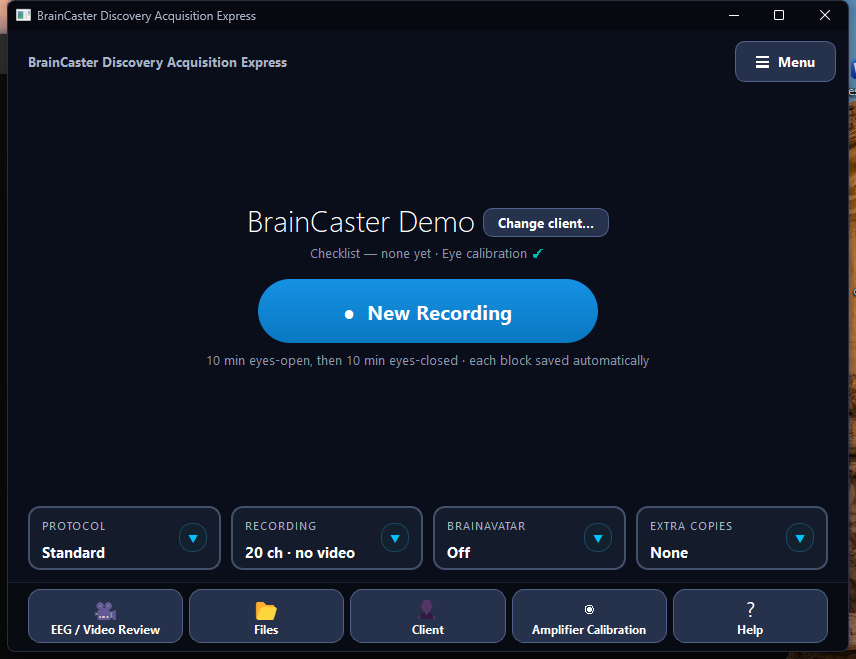
 Figure 1. The live screen during a session. Live EEG is on the right, with a contact-quality column beside the traces. The left pane shows the eye-artifact-cleaned signal that is being streamed to BrainAvatar.
 Figure 2. The review console. The EEG and the webcam video move together, with a spectrum and band summary for the selected channel. (Face blurred for this example.)
 Figure 3. BrainAvatar showing live z-scores computed from EEG that Express is streaming over LSL.
 Figure 4. An amplifier calibration report: measured frequency response of a Discovery 24E, with the acceptance band shaded.
Privacy Overview
This website uses cookies to improve your experience while you navigate through the website. Out of these cookies, the cookies that are categorized as necessary are stored on your browser as they are essential for the working of basic functionalities of the website. We also use third-party cookies that help us analyze and understand how you use this website. These cookies will be stored in your browser only with your consent. You also have the option to opt-out of these cookies. But opting out of some of these cookies may have an effect on your browsing experience.
Necessary cookies are absolutely essential for the website to function properly. This category only includes cookies that ensures basic functionalities and security features of the website. These cookies do not store any personal information.
Functional cookies help to perform certain functionalities like sharing the content of the website on social media platforms, collect feedbacks, and other third-party features.
Performance cookies are used to understand and analyze the key performance indexes of the website which helps in delivering a better user experience for the visitors.
| Cookie | Duration | Description |
|---|---|---|
| ac_enable_tracking | 1 month | This cookie is set by Active Campaign to denote that traffic is enabled for the website. |
| _gat | 1 minute | Google Universal Analytics sets this cookie to restrain request rate and thus limit data collection on high-traffic sites. |
Analytical cookies are used to understand how visitors interact with the website. These cookies help provide information on metrics the number of visitors, bounce rate, traffic source, etc.
| Cookie | Duration | Description |
|---|---|---|
| CONSENT | 2 years | YouTube sets this cookie via embedded YouTube videos and registers anonymous statistical data. |
| _ga | 1 year 1 month 4 days | Google Analytics sets this cookie to calculate visitor, session and campaign data and track site usage for the site's analytics report. The cookie stores information anonymously and assigns a randomly generated number to recognise unique visitors. |
| _gat_gtag_UA_* | 1 minute | Google Analytics sets this cookie to store a unique user ID. |
| _ga_* | 1 year 1 month 4 days | Google Analytics sets this cookie to store and count page views. |
| _gcl_au | 3 months | Google Tag Manager sets the cookie to experiment advertisement efficiency of websites using their services. |
| _gid | 1 day | Google Analytics sets this cookie to store information on how visitors use a website while also creating an analytics report of the website's performance. Some of the collected data includes the number of visitors, their source, and the pages they visit anonymously. |
Advertisement cookies are used to provide visitors with relevant ads and marketing campaigns. These cookies track visitors across websites and collect information to provide customized ads.
| Cookie | Duration | Description |
|---|---|---|
| test_cookie | 15 minutes | doubleclick.net sets this cookie to determine if the user's browser supports cookies. |
| VISITOR_INFO1_LIVE | 5 months 27 days | YouTube sets this cookie to measure bandwidth, determining whether the user gets the new or old player interface. |
| YSC | session | Youtube sets this cookie to track the views of embedded videos on Youtube pages. |
| yt-remote-connected-devices | never | YouTube sets this cookie to store the user's video preferences using embedded YouTube videos. |
| yt-remote-device-id | never | YouTube sets this cookie to store the user's video preferences using embedded YouTube videos. |
| yt.innertube::nextId | never | YouTube sets this cookie to register a unique ID to store data on what videos from YouTube the user has seen. |
| yt.innertube::requests | never | YouTube sets this cookie to register a unique ID to store data on what videos from YouTube the user has seen. |
Other uncategorized cookies are those that are being analyzed and have not been classified into a category as yet.
| Cookie | Duration | Description |
|---|---|---|
| docs_visited_10761 | 5 months 27 days | Description is currently not available. |
| docs_visited_10764 | 5 months 27 days | Description is currently not available. |
| docs_visited_10767 | 5 months 27 days | Description is currently not available. |
| docs_visited_10770 | 5 months 27 days | Description is currently not available. |
| docs_visited_11013 | 5 months 27 days | Description is currently not available. |
| docs_visited_11016 | 5 months 27 days | Description is currently not available. |
| docs_visited_11020 | 5 months 27 days | Description is currently not available. |
| docs_visited_11265 | 5 months 27 days | Description is currently not available. |
| docs_visited_11269 | 5 months 27 days | Description is currently not available. |
| docs_visited_11275 | 5 months 27 days | Description is currently not available. |
| docs_visited_11278 | 5 months 27 days | Description is currently not available. |
| docs_visited_11281 | 5 months 27 days | Description is currently not available. |
| docs_visited_11525 | 5 months 27 days | Description is currently not available. |
| docs_visited_11528 | 5 months 27 days | Description is currently not available. |
| docs_visited_11532 | 5 months 27 days | Description is currently not available. |
| docs_visited_11536 | 5 months 27 days | Description is currently not available. |
| docs_visited_11778 | 5 months 27 days | Description is currently not available. |
| docs_visited_11791 | 5 months 27 days | Description is currently not available. |
| docs_visited_12033 | 5 months 27 days | Description is currently not available. |
| docs_visited_12037 | 5 months 27 days | Description is currently not available. |
| docs_visited_12042 | 5 months 27 days | Description is currently not available. |
| docs_visited_12048 | 5 months 27 days | Description is currently not available. |
| docs_visited_8962 | 5 months 27 days | Description is currently not available. |
| docs_visited_8966 | 5 months 27 days | Description is currently not available. |
| docs_visited_8970 | 5 months 27 days | Description is currently not available. |
| docs_visited_8975 | 5 months 27 days | Description is currently not available. |
| docs_visited_8979 | 5 months 27 days | Description is currently not available. |
| docs_visited_9219 | 5 months 27 days | Description is currently not available. |
| docs_visited_9223 | 5 months 27 days | Description is currently not available. |
| docs_visited_9227 | 5 months 27 days | Description is currently not available. |
| docs_visited_9231 | 5 months 27 days | Description is currently not available. |
| docs_visited_9235 | 5 months 27 days | Description is currently not available. |
| docs_visited_9474 | 5 months 27 days | Description is currently not available. |
| docs_visited_9478 | 5 months 27 days | Description is currently not available. |
| docs_visited_9486 | 5 months 27 days | Description is currently not available. |
| docs_visited_9490 | 5 months 27 days | Description is currently not available. |
| docs_visited_9732 | 5 months 27 days | Description is currently not available. |
| docs_visited_9736 | 5 months 27 days | Description is currently not available. |
| docs_visited_9740 | 5 months 27 days | Description is currently not available. |
| docs_visited_9744 | 5 months 27 days | Description is currently not available. |
| prism_649921125 | 1 month | Description is currently not available. |
| viewer_id | 1 year | No description available. |
| __mmapiwsid | never | No description available. |
Powered by 
